
For most laptop desks, home offices, and bedside tables, the OCOOPA USB Desk Table Fan is the best USB fan to buy. It is affordable, quiet enough for close-range use, easy to aim, and powered by the USB kit most people already have nearby.
USB fans are not made to cool a whole room. They are made for personal airflow from a laptop, monitor hub, power bank, or wall adaptor. Below, we have picked the strongest current USB fan options for UK buyers, including wired desk fans, rechargeable models, and clip-on fans.
Contents
- 1 Our Top Picks
- 2 7 Best USB Fans
- 2.1 1. OCOOPA USB Desk Table Fan
- 2.2 2. TriPole USB Desk Fan
- 2.3 3. gaiatop USB Desk Fan
- 2.4 4. Otlonpe Portable Rechargeable USB Desk Fan
- 2.5 5. WHATOOK Mini Desk Fan USB
- 2.6 6. KIMMOO Rechargeable USB Desk Fan
- 2.7 7. 12000mAh Rechargeable Clip On USB Fan
- 2.8 Key Takeaways
- 2.9 Powered vs Battery USB Fans
- 2.10 Clip-On vs Freestanding vs Desktop
- 2.11 Noise: What to Expect
- 2.12 USB Connectivity: USB-A, USB-C, and Power Requirements
- 2.13 Things to Keep in Mind Before Buying
- 2.14 Types of USB Fan
- 3 Case Study: Cooling a Laptop Workstation
- 4 Expert Insights From Our Heating Engineers About USB Fans
- 5 Frequently Asked Questions
- 6 Summing Up
Our Top Picks
| Image | Name | |
|---|---|---|
| OCOOPA USB Desk Table Fan | |
| TriPole USB Desk Fan | |
| gaiatop USB Desk Fan | |
| Otlonpe Portable Rechargeable USB Desk Fan | |
| WHATOOK Mini Desk Fan USB | |
| KIMMOO Rechargeable USB Desk Fan | |
| 12000mAh Rechargeable Clip On USB Fan |
7 Best USB Fans
1. OCOOPA USB Desk Table Fan
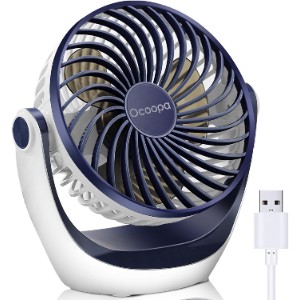
The OCOOPA USB Desk Table Fan is the best all-round USB fan here because it gets the basics right without becoming expensive. It is compact, stable, easy to power from a USB port, and strong enough to make a real difference when you are sitting at a desk.
The three speed settings are useful because close-range airflow can become annoying if you cannot dial it down. On low, it works as a background breeze for typing or reading. On high, it has enough push for stuffy home offices and warm bedrooms.
The 360 degree adjustable head is the feature you appreciate after a few days. You can aim the airflow at your chest, across the desk, or slightly above your face rather than blasting your eyes. It also has rubber feet, which helps stop vibration from travelling through a desk.
It does not have a battery, so it needs to stay plugged in. For a true desk fan, that is not a big problem. If you want cordless use, choose the Otlonpe or WHATOOK instead.
USB fans are at their best when you treat them as personal cooling tools. They are cheap to run and easy to power, but they do not have the blade size or motor strength to behave like a full room fan.
Features
- USB-powered desk fan
- Three speed settings
- 360 degree adjustable head
- Quiet brushless motor
- Rubber feet for stability
- Suitable for laptop, power bank, wall adaptor, and USB hub use
- Best balance of price, airflow, and usability
- Easy to aim accurately
- Quiet enough for desk work
- Strong customer review base
- No built-in battery
- Personal cooling only
2. TriPole USB Desk Fan
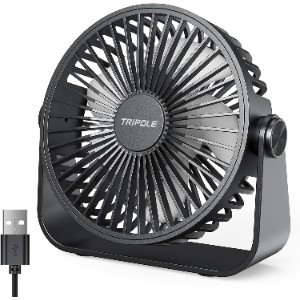
The TriPole USB Desk Fan is a brilliant budget option if you want something smaller and lighter than the OCOOPA. It is only 4.5 inches across, so it works well on crowded desks, student desks, bedside shelves, and office corners where a larger fan would get in the way.
Despite the size, it gives you three speeds and a 360 degree rotating head. The 1.5m cable is also genuinely useful because short USB fan cables can force awkward placement beside a laptop or monitor.
The removable front cover is a quiet win. Mini fans collect fluff quickly, and being able to clean the blades properly helps keep airflow fresher through summer.
Power source matters more than many buyers expect. A laptop port, monitor hub, power bank and wall adaptor may all behave slightly differently, especially with stronger USB fans that draw more current on high speed.
Features
- 4.5 inch USB desk fan
- Three speed settings
- 360 degree head rotation
- 1.5m USB cable
- Removable front cover for cleaning
- Approximate weight: 157g
- Very affordable
- Small footprint for cramped desks
- Longer cable than many mini fans
- No battery
- Too small for room cooling
- Basic controls only
3. gaiatop USB Desk Fan
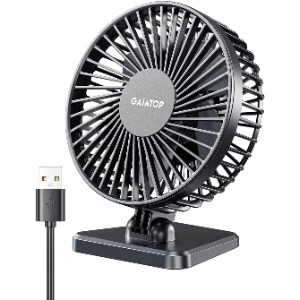
The gaiatop USB Desk Fan is for people who want the smallest practical fan they can leave in a bag or drawer. It is not sophisticated, but it is light, cheap, and popular for a reason.
It has three speeds and a simple tilting head. The adjustment range is limited compared with the OCOOPA or TriPole, but it is enough for basic personal cooling at a laptop or dressing table.
This is the one to buy as a spare fan for a work bag, car, or small home office. It is not the strongest pick, but it gives decent comfort for very little money.
The most useful models are the ones you can position properly. A tilting head, stable base or clip can make more difference than a tiny increase in maximum speed.
Features
- Compact USB-powered fan
- Three speed settings
- Vertical angle adjustment
- Lightweight body
- Compatible with laptop, power bank, car charger, and USB adaptor use
- Tiny and easy to carry
- Very low price
- Good for personal close-up cooling
- Limited tilt range
- No battery
- Less refined than larger models
4. Otlonpe Portable Rechargeable USB Desk Fan
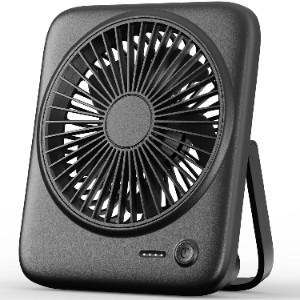
The Otlonpe Portable Rechargeable USB Desk Fan is the best USB fan here if you want cordless use as well as plug-in operation. The 4000mAh battery makes it much more flexible than a wired-only model, especially for bedside tables, travel, camping, and garden offices.
It has four speed settings and folds down neatly, so it can move between desk, bag, and bedside without feeling awkward. Otlonpe claims up to 23 hours on low, although real-world runtime will drop sharply if you use the stronger speeds.
The emergency charging feature is useful in a pinch, but treat it as backup rather than the main reason to buy. The main appeal is simple: it is a cheap, compact fan that works with or without a cable.
USB fans are at their best when you treat them as personal cooling tools. They are cheap to run and easy to power, but they do not have the blade size or motor strength to behave like a full room fan.
Features
- Rechargeable USB desk fan
- 4000mAh battery
- Four speed settings
- USB-powered or battery-powered use
- Foldable stand
- Detachable frame for cleaning
- Emergency phone charging function
- Works corded or cordless
- Good battery capacity for the price
- Compact foldable design
- Not as powerful as larger desk fans
- Battery life varies heavily by speed
- Small body means close-range cooling only
5. WHATOOK Mini Desk Fan USB
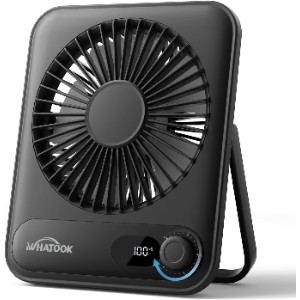
The WHATOOK Mini Desk Fan USB is the most adjustable compact fan in this selection. Instead of three fixed speeds, it gives you 1 to 100 speed control, so you can set the breeze much more precisely.
That makes sense for bedrooms and offices where one speed feels too weak and the next feels too harsh. The LED display also shows battery and speed, which removes some of the guesswork from rechargeable fan use.
The grille is designed to be narrow and child-safe, which is worth noting for family homes. The battery is smaller than the Otlonpe, so it is not the long-runtime pick, but it is a clever little desk fan for controlled airflow.
Power source matters more than many buyers expect. A laptop port, monitor hub, power bank and wall adaptor may all behave slightly differently, especially with stronger USB fans that draw more current on high speed.
Features
- Rechargeable USB-C desk fan
- 1 to 100 speed control
- LED speed and battery display
- 2000mAh battery
- Up to 10 hours runtime on low
- Slim profile
- Narrow child-safe grille
- Very precise speed control
- Useful display
- Slim and modern design
- Smaller battery than some rivals
- More controls than some users need
- Still only for personal cooling
6. KIMMOO Rechargeable USB Desk Fan
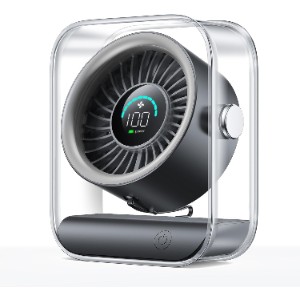
The KIMMOO Rechargeable USB Desk Fan is another strong choice if you like digital controls and fine airflow adjustment. It offers 100 speed settings, a battery display, and a more forceful turbo-style airflow than many basic USB fans.
It is heavier and chunkier than the tiny gaiatop or TriPole, but that also makes it feel more capable on a desk. The 90 degree rotation helps with aiming, and the rechargeable battery makes it useful away from a plug.
The review base is much smaller than the OCOOPA or JISULIFE-style options, so it is a slightly less proven choice. Still, the specification is strong if you want a compact rechargeable fan with more power than the cheapest models.
The most useful models are the ones you can position properly. A tilting head, stable base or clip can make more difference than a tiny increase in maximum speed.
Features
- Rechargeable USB desk fan
- 100 speed settings
- LED battery and speed display
- 90 degree rotating design
- Up to 8.5 hours runtime
- 2.5-hour recharge time with suitable adaptor
- Compact 418g body
- Powerful for its size
- Fine speed control
- Rechargeable and portable
- Much smaller review base than top picks
- More expensive than simple USB fans
- Not as pocketable as mini models
7. 12000mAh Rechargeable Clip On USB Fan
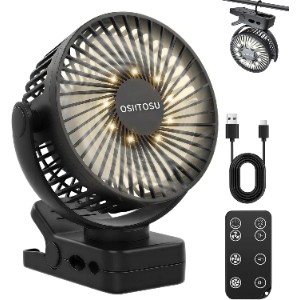
This 12000mAh Rechargeable Clip On USB Fan is the most versatile option here. It can be used as a clip fan, desk fan, or hanging fan, which makes it useful for camping, pushchairs, workshops, shelves, tents, and awkward desks.
The huge battery is the headline feature. Runtime claims always depend on speed and light use, but a 12000mAh pack gives far more headroom than the small rechargeable desk fans above. It also includes a remote, timer, and light, which helps when it is clipped somewhere out of reach.
It is not the prettiest office fan, and the review base is still small. This is more of a utility pick than a polished desk accessory. For flexible placement, though, it does a lot.
USB fans are at their best when you treat them as personal cooling tools. They are cheap to run and easy to power, but they do not have the blade size or motor strength to behave like a full room fan.
Features
- Rechargeable clip-on USB fan
- 12000mAh battery
- Clip, desk, and hanging modes
- Three speeds
- Remote control
- Timer settings
- Built-in light
- 360 degree adjustment
- Excellent placement flexibility
- Large battery capacity
- Remote and timer are useful
- Bulkier than normal USB fans
- Small review base
- Utility design will not suit every desk
Key Takeaways
- USB fans are low-power personal cooling devices that plug into a USB-A or USB-C port on a computer, laptop, portable charger, or USB wall adapter. They draw 2.5 to 10W, making them among the most economical electric fans available: running a 5W USB fan 8 hours a day costs approximately 1p per day at 27p/kWh
- USB fans are personal cooling tools, not room fans. They create a cooling airflow within 50 to 100cm of the fan head. They are not designed to cool a room; they’re designed to cool you at a desk, workstation, or bedside table
- Battery-powered USB fans with built-in rechargeable cells are a separate category. These untether the fan from a power socket and allow cordless use anywhere. Battery capacity (measured in mAh) determines runtime: a 4,000mAh battery at medium speed typically lasts 6 to 12 hours. Charge via USB-C
- Clip-on USB fans attach to a monitor, shelf, desk partition, or headboard, freeing up desk space and directing airflow more precisely than a freestanding fan. They’re particularly useful in small workspaces where a conventional fan base would be intrusive
- Noise is the key quality differentiator in USB fans. Budget fans with poorly balanced blades create audible vibration and wind noise even at low speeds. Quality mini fans with DC motors and curved blades run near-silently at low and medium speeds, which matters for desk use during calls or in quiet open-plan offices
- Speed settings determine usability. A fan with only one speed is rarely comfortable. Two to three mechanical speed settings is the minimum; models with stepless speed control via a scroll wheel or touch control allow you to find the exact airflow level that’s comfortable without dialling back to one of two preset speeds
Powered vs Battery USB Fans
Direct-powered USB fans draw current continuously from the connected USB port. They work whenever plugged in and have no run-time limit, but they require a power source nearby. For a fixed desk setup with a laptop or PC, this is no constraint at all; the fan plugs into a spare USB port and runs indefinitely. For use at a window seat, in a kitchen, or anywhere without a USB port nearby, direct-powered fans need a USB wall adapter.
Battery-powered fans with integrated rechargeable cells are more versatile. They charge from any USB source and then operate wirelessly. The useful run time depends on battery capacity and fan speed: a 4,000mAh battery at low speed may last 15 to 20 hours; the same battery on high speed may last 3 to 4 hours. Look for USB-C charging (faster and more future-proof than micro-USB) and check whether the fan can operate while charging, which allows continuous use when you’re near a charger.
Some models also function as USB power banks, charging other devices from their battery. This doubles the usefulness of the fan’s battery capacity on a commute or at an outdoor event.
Clip-On vs Freestanding vs Desktop
Freestanding desktop USB fans have a weighted base that sits on a flat surface and a fan head mounted on a short column. They’re the most common design and suit desk use well. The base typically accommodates the USB cable neatly. Fan heads on better models adjust up and down for angle and some oscillate horizontally.
Clip-on USB fans attach to a shelf, monitor edge, desk partition, or headboard with a spring clamp. The advantage is that they take up no desk surface and direct airflow from a different height and angle than a desk-level fan. A clip fan mounted on a monitor top directs air downward towards your face, which is often more effective than a desk fan blowing horizontally at your chin. Check the maximum clamp width before buying; most are designed for panels 30 to 60mm thick.
Handheld-convertible USB fans fold into a handheld format for use on the move and unfold or attach to a mini stand for desk use. These are particularly useful if you want one fan to cover both commuting and office use. The blade housings are typically enclosed in a protective cage to prevent finger contact during handheld use.
Noise: What to Expect
USB fan noise is primarily a function of motor quality and blade design, not simply speed. A well-engineered DC motor fan at medium speed can be practically inaudible. A poorly balanced brushed motor fan creates rattling or buzzing noise at any speed. For desk use during video calls, a fan that’s clearly audible to your microphone is a problem; better models are designed with this in mind.
Enclosed-blade designs (blades inside a protective housing, rather than open like a traditional pedestal fan) tend to run quieter because the housing directs airflow more smoothly, reducing turbulence noise. They’re also safer for use near children and pets. The downside is slightly less raw airflow compared to an equivalent open-blade design.
USB Connectivity: USB-A, USB-C, and Power Requirements
Most USB fans use standard USB-A connectors and draw less than 5W, compatible with any standard USB port. Higher-powered models (above 5W) may require a USB port capable of delivering more current, such as a USB 3.0 port (which outputs up to 900mA / 4.5W) or a USB-C port with power delivery.
Check the power draw before plugging into a laptop USB hub. Older laptop USB-A ports output 500mA (2.5W); some fans marketed as “powerful USB fans” draw more than this and will either run at reduced speed or trigger the laptop’s USB overcurrent protection. Direct USB-C ports on modern laptops are more generous with current output.
Things to Keep in Mind Before Buying
Cable length determines placement flexibility. Most USB fans have cables of 0.8 to 1.5m. If your nearest USB power source is a wall adapter some distance from your desk, a longer cable or a USB extension lead is needed. Check the cable length in the product specification.
360-degree head adjustment on clip-on fans allows the airflow direction to be precisely set regardless of mounting angle. Fixed-head clip fans only direct air in one direction relative to the clip, which limits flexibility. Adjustable heads are worth the small premium for clip-on models.
Types of USB Fan
Basic desk USB fans (freestanding, 2 to 3 speeds, USB-A) are the lowest-cost personal cooling option. Functional for occasional use, noticeable at high speed. Price range £5 to £20.
DC motor quiet desk fans (4 to 5 speeds, near-silent operation) are worth the premium for open-plan offices, video call environments, and bedrooms. Smooth speed adjustment, significantly quieter than budget AC motor alternatives. Price range £20 to £50.
Rechargeable battery USB fans (4,000 to 8,000mAh, USB-C charging) are the versatile choice for those who want cordless use at a desk, garden, commute, and bedroom without needing a nearby socket. Price range £20 to £60.
Clip-on USB fans free up desk space and provide flexible mounting at monitor level, headboards, and partitions. Best with adjustable head and enclosed blade housing. Price range £10 to £40.
Case Study: Cooling a Laptop Workstation
Background
A remote worker in a small flat found that their desk became uncomfortable in summer, especially when the laptop, monitor, and charger were all adding heat.
Project Overview
The aim was to add close-range cooling without buying a large fan or using another floor-level plug socket.
Implementation
They chose a compact USB desk fan, powered it from a spare USB wall adaptor, and placed it slightly to one side of the monitor rather than directly in front of the keyboard.
Results
The fan did not cool the whole room, but it made desk work far more comfortable. Moving it off-axis also stopped the airflow from hitting the microphone during calls.
Expert Insights From Our Heating Engineers About USB Fans
“A USB fan is a personal comfort tool. It is excellent when you are sitting close to it, but it will not fix a badly overheated room. Match the expectation to the size of the fan.”
“One of our senior heating engineers with over 15 years of experience recommends checking the power source. A weak USB hub can make a fan feel poor even when the fan itself is fine.”
“The boring details matter: stable base, clean cable route, removable grille, and a low speed you can tolerate for hours. That is what separates a useful USB fan from desk clutter.”
Frequently Asked Questions
Can a USB fan cool a room?
Usually not. USB fans are best for personal cooling at close range. A larger desk fan, tower fan, or air circulator is better for room airflow. For best results, use a suitable USB power source and keep expectations realistic: these are personal fans, not room-cooling appliances.
Can I run a USB fan from a laptop?
Yes, if the fan’s power requirement matches what the USB port can supply. For stronger fans, a USB wall adaptor or power bank may work better. For best results, use a suitable USB power source and keep expectations realistic: these are personal fans, not room-cooling appliances.
Are rechargeable USB fans worth it?
They are worth it if you move the fan around, use it outdoors, or want cable-free bedside cooling. For a permanent desk setup, a wired USB fan is simpler. For best results, use a suitable USB power source and keep expectations realistic: these are personal fans, not room-cooling appliances.
How much electricity does a USB fan use?
Very little. Most USB fans use only a few watts, so their running costs are usually tiny compared with air conditioners or large cooling appliances. For best results, use a suitable USB power source and keep expectations realistic: these are personal fans, not room-cooling appliances.
Is USB-C better for a fan?
USB-C is more convenient and future-proof for rechargeable fans. It is reversible, widely used, and often supports faster charging where the fan allows it. For best results, use a suitable USB power source and keep expectations realistic: these are personal fans, not room-cooling appliances.
Can I leave a USB fan on overnight?
Only use it overnight if it is in good condition, placed securely, and powered by a suitable adaptor or charged battery. Keep it away from bedding, liquids, and loose cables. For best results, use a suitable USB power source and keep expectations realistic: these are personal fans, not room-cooling appliances.
Summing Up
The OCOOPA USB Desk Table Fan is the best USB fan for most people because it is affordable, stable, quiet enough for desk work, and easy to aim. It is a simple fan, but it does the important things well.
If you want the smallest possible option, choose the gaiatop or TriPole. If you want cordless use, the Otlonpe and WHATOOK make more sense. For camping, shelves, and awkward positions, the rechargeable clip-on fan is the more flexible choice.
Updated