
For most UK desks, bedrooms, and home offices, the MeacoFan Sefte 10 Inch Table Air Circulator is the best desk fan to buy. It is quiet, efficient, powerful enough to move air around a small room, and far more refined than a cheap plastic fan that rattles through a video call.
Desk fans now range from tiny USB models to smart air circulators with app control, so the right choice depends on whether you want personal cooling, whole-room airflow, low noise for sleep, or something you can move around the house. Below, we have compared the best desk fans for UK homes and offices.
Contents
- 1 Our Top Picks
- 2 8 Best Desk Fans
- 2.1 1. MeacoFan Sefte 10 Inch Table Air Circulator
- 2.2 2. DREO Smart Table Fan
- 2.3 3. Honeywell TurboForce HT900E Power Fan
- 2.4 4. DREO 25dB Quiet Desk Fan
- 2.5 5. Russell Hobbs 12 Inch Desk Fan
- 2.6 6. OCOOPA USB Desk Table Fan
- 2.7 7. Dimplex DXRCFN Cordless Desk Fan
- 2.8 8. Otlonpe Portable Rechargeable Desk Fan
- 3 Desk Fan Buying Guide
- 3.1 Key Takeaways
- 3.2 What Is a Desk Fan?
- 3.3 How Do Desk Fans Work?
- 3.4 Desk Fan vs Air Circulator vs Tower Fan
- 3.5 How Much Airflow Do You Need?
- 3.6 Noise Levels for Work and Sleep
- 3.7 Power Use and Running Costs
- 3.8 USB, Battery, or Mains Power?
- 3.9 Oscillation, Tilt, and Placement
- 3.10 Safety Around Sockets, Cables, and Desks
- 3.11 Cleaning and Maintenance
- 3.12 When a Desk Fan Is the Wrong Choice
- 3.13 Useful Features Worth Paying For
- 3.14 Common Mistakes to Avoid
- 3.15 Before You Buy: Quick Checklist
- 3.16 Desk Fan Placement for Work and Sleep
- 3.17 Noise, Buttons and Night Modes
- 4 Case Study: Cooling a Small Home Office
- 5 Expert Insights From Our Heating Engineers About Desk Fans
- 6 Frequently Asked Questions
- 7 Summing Up
Our Top Picks
| Image | Name | |
|---|---|---|
| MeacoFan Sefte 10 Inch Table Air Circulator | |
| DREO Smart Table Fan | |
| Honeywell TurboForce HT900E Power Fan | |
| DREO 25dB Quiet Desk Fan | |
| Russell Hobbs 12 Inch Desk Fan | |
| OCOOPA USB Desk Table Fan | |
| Dimplex DXRCFN Cordless Desk Fan | |
| Otlonpe Portable Rechargeable Desk Fan |
8 Best Desk Fans
1. MeacoFan Sefte 10 Inch Table Air Circulator
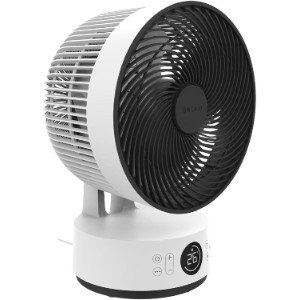
The MeacoFan Sefte 10 Inch Table Air Circulator is the best desk fan here because it behaves less like a basic desk fan and more like a miniature room air circulator. Instead of blasting one narrow stream of air at your face, it can move air around a bedroom, study, or small living space with far more finesse.
That matters if you work from home. A harsh fan directly beside a keyboard gets annoying quickly, especially when it dries your eyes or drowns out a call. The Sefte gives you 12 speeds, horizontal and vertical oscillation, and a night mode, so you can set a gentle breeze for close-up use or push more air around the room when it is properly hot.
It is also efficient. Meaco lists power use at roughly 8 to 26W, which is tiny compared with portable air conditioning and still modest compared with many old-style fans. The low noise levels and glow-in-the-dark remote are small touches, but they make a difference if you also want to use it on a bedside table.
The catch is size and price. It is not a tiny USB fan, and it costs more than the bargain models. Still, if you want one desk-friendly fan that can do bedroom, office, and general home cooling properly, this is the most rounded choice.
The difference between an average desk fan and a good one often shows up after an hour, not in the first ten seconds. A fan that is too loud, too direct or awkward to aim can become irritating even if it looks powerful on paper.
Features
- 10 inch table air circulator
- 12 speed settings
- Horizontal and vertical oscillation
- Night mode with lights and bleeps disabled
- Remote control
- Low energy DC motor
- Approximate power range: 8 to 26W
- Excellent all-round cooling for desks and bedrooms
- Very quiet on low settings
- Strong air circulation rather than a weak direct breeze
- Useful night mode and remote control
- More expensive than basic desk fans
- Larger than compact USB models
2. DREO Smart Table Fan
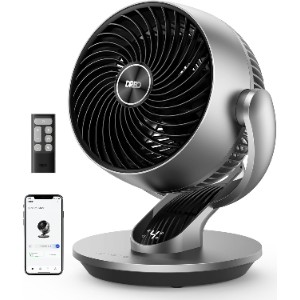
If you want smart controls without buying a tower fan, the DREO Smart Table Fan is a strong pick. It gives you app control, voice assistant support, a remote, four speeds, five modes, and a 12-hour timer through the app. For a desk fan, that is a generous feature list.
The airflow is more sophisticated than you get from a standard bladed fan. It oscillates horizontally up to 90 degrees and can be manually tilted vertically up to 120 degrees, which makes it easier to bounce air around a room or aim it above your head rather than straight into your eyes.
It is also quiet enough for most bedrooms and home offices, with a quoted low-noise figure around 28 dB. The body is compact for the airflow it produces, though it still takes up more surface space than a mini USB fan. Think of it as a small air circulator rather than a throwaway desk accessory.
The smart features are useful if the fan lives across the room, but not everyone needs them. If you simply want a cheap fan next to a laptop, the OCOOPA or Honeywell will make more sense.
For home offices, low-speed performance is especially important. You want enough air movement to feel cooler without drying your eyes, lifting papers or making video calls sound like you are sitting beside a turbine.
Features
- 7 inch smart table fan
- Four speeds and five modes
- 90 degree horizontal oscillation
- 120 degree manual vertical tilt
- Remote, app, and voice control
- 12-hour app timer
- Quoted noise as low as 28.5 dB
- Smart app and voice control
- Good oscillation for a desk-sized fan
- Quiet enough for office and bedroom use
- Useful timer and child lock
- Costs more than non-smart models
- App control is unnecessary for simple close-up cooling
3. Honeywell TurboForce HT900E Power Fan
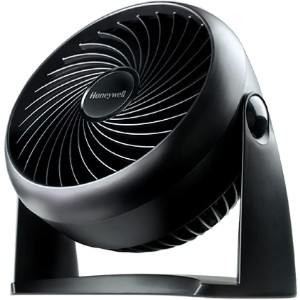
The Honeywell TurboForce HT900E is the one to buy if you want power for sensible money. It has been around for years, and that is part of the appeal. It is simple, widely reviewed, easy to understand, and far stronger than many flimsy desk fans in the same price range.
It is best treated as a focused air mover. The head tilts up to 90 degrees, so you can point it across a desk, towards a doorway, or up at the ceiling to stir warmer air. It can also be wall mounted, which is handy in a workshop, small office, or bedroom where surface space is limited.
The trade-off is refinement. It has three speeds rather than a long list of modes, and it is not as quiet or polished as the Meaco or DREO options. On higher settings, you will know it is running. For the price, though, the amount of airflow is hard to argue with.
Placement changes the result too. A slight angle across the desk, or airflow bounced gently around a small room, can feel better than pointing the fan straight at your face all afternoon.
Features
- Three speed settings
- 90 degree variable tilt head
- Tabletop or wall-mountable design
- Focused TurboForce airflow
- Compact body for desks and shelves
- Quoted sound range around 39 to 56 dB
- Powerful airflow for the money
- Simple and robust design
- Can be wall mounted
- Not the quietest option on higher speeds
- No remote, timer, or smart controls
- Focused airflow can feel too direct close up
4. DREO 25dB Quiet Desk Fan
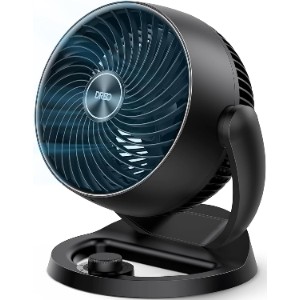
This DREO 25dB Quiet Desk Fan is the more straightforward alternative to the smart DREO model above. It drops the app controls and keeps the core cooling features: strong airflow, quiet running, a compact body, and a head that tilts through a wide range.
The main strength is practicality. It can sit on a desk, bedside table, or shelf, and it can be wall mounted if you want to save surface space. The 120 degree tilt helps when you want to move air around the room rather than aim a blast at one person.
It only has three speeds, so it is less fine-tuned than the Meaco or smart DREO. But that can be a plus if you prefer a fan with a simple knob rather than an app, remote, or touch panel. Plug it in, choose a speed, done.
The difference between an average desk fan and a good one often shows up after an hour, not in the first ten seconds. A fan that is too loud, too direct or awkward to aim can become irritating even if it looks powerful on paper.
Features
- Air circulator style desk fan
- Three speed settings
- 120 degree adjustable tilt
- Wall-mountable design
- Quoted airflow reach up to 70 ft
- Quoted low noise around 25 dB
- Built-in carry handle
- Strong airflow from a compact fan
- Simple controls are easy to live with
- Wall-mountable for tight spaces
- No automatic oscillation
- Only three speeds
- Less stylish than premium air circulators
5. Russell Hobbs 12 Inch Desk Fan
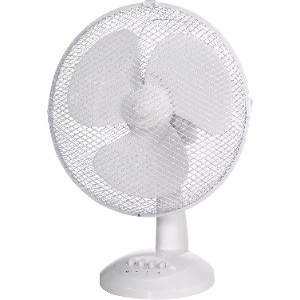
The Russell Hobbs 12 Inch Desk Fan is a classic oscillating desk fan, which is exactly what some buyers still want. It has a larger fan head than compact USB models, three speeds, and 90 degree oscillation for spreading airflow across a desk, bed, or small room.
It is a good middle ground if you do not want an air circulator shape. The controls are simple, the head is large enough to move a decent amount of air, and the white finish looks less industrial than the Honeywell. Quiet Mark approval is also reassuring if you are worried about cheap fans buzzing away in the background.
It is not as compact as it first appears, so check your desk depth before buying. At 12 inches, it can dominate a small workstation. For bedside tables or cramped desks, a smaller USB or rechargeable model may be easier to place.
For home offices, low-speed performance is especially important. You want enough air movement to feel cooler without drying your eyes, lifting papers or making video calls sound like you are sitting beside a turbine.
Features
- 12 inch desk fan
- Three speed settings
- 90 degree oscillation
- Quiet Mark approved
- Front-facing controls
- Approximate size: 48 x 35 x 23 cm
- Approximate weight: 1.79 kg
- Familiar oscillating fan design
- Good airflow spread for desks and bedrooms
- Simple controls and decent value
- Too large for very small desks
- No timer or remote
- Not as efficient or refined as DC air circulators
6. OCOOPA USB Desk Table Fan
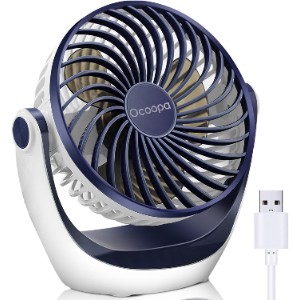
The OCOOPA USB Desk Table Fan is a neat answer to a very common problem: you want a personal fan at your laptop, but you do not want another mains plug under the desk. It runs from USB, so it can be powered by a computer, power bank, wall adaptor, or docking station.
It is small, cheap, and surprisingly useful for personal cooling. The head adjusts through 360 degrees, and the three speeds give you enough control for close-range use. At low speed it is unobtrusive enough for many work setups, while the higher speed gives a noticeable breeze when a room gets stuffy.
Do not expect whole-room performance. This is not a replacement for a proper air circulator or larger oscillating fan. It is best for one person at one desk, which is exactly why it earns a place on this list.
Placement changes the result too. A slight angle across the desk, or airflow bounced gently around a small room, can feel better than pointing the fan straight at your face all afternoon.
Features
- USB-powered desk fan
- Three speed settings
- 360 degree adjustable head
- Rubber feet for stability
- Compatible with computer USB ports and power banks
- Compact personal cooling design
- Excellent value
- Runs from USB
- Compact enough for small desks
- Personal cooling only
- No battery
- Needs a suitable USB power source
7. Dimplex DXRCFN Cordless Desk Fan
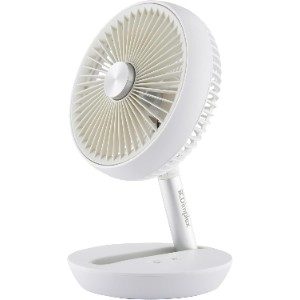
The Dimplex DXRCFN is the best choice here if you want a desk fan you can move around without trailing a cable everywhere. It has a built-in 4000mAh battery, USB-C charging, and a fold-flat design, so it can go from desk to bedside table to kitchen counter without fuss.
It is also travel-friendly. The carry strap and dust bag make sense for commuting, camping, or summer weekends away, and the foldable body is easier to pack than a fixed table fan. Four speed modes give it more flexibility than many bargain rechargeable models.
The obvious limitation is battery management. Cordless fans are brilliant when charged, but less charming when you realise the battery is flat at bedtime. If it will live permanently on a desk, a mains-powered model will be less faff.
The difference between an average desk fan and a good one often shows up after an hour, not in the first ten seconds. A fan that is too loud, too direct or awkward to aim can become irritating even if it looks powerful on paper.
Features
- Cordless rechargeable desk fan
- 4000mAh battery
- USB-C charging
- Up to 15 hours of battery life
- Four speed modes
- Foldable body with carry strap
- Tilting head
- Cordless design is genuinely useful
- Foldable and easy to store
- Good choice for travel and flexible workspaces
- Needs charging
- Not as powerful as larger mains fans
- Battery life depends heavily on speed setting
8. Otlonpe Portable Rechargeable Desk Fan
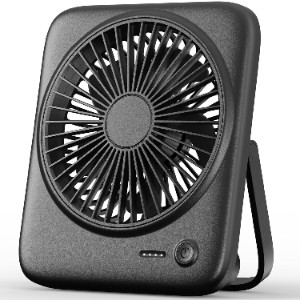
The Otlonpe Portable Rechargeable Desk Fan is a budget cordless option for people who want something small, cheap, and easy to carry. It has a 4000mAh battery, four speeds, and a foldable stand, so it works on a desk, bedside table, or in a bag for travel.
Its biggest appeal is price. You get rechargeable use for far less than the Dimplex, and the compact 6.5 inch body is handy when you are short on space. It is also useful as a backup fan during warm commutes, camping trips, or stuffy hotel rooms.
There are compromises. It is a personal fan, not a room cooler, and the build will not feel as premium as the more expensive options. Still, as a cheap rechargeable fan for close-range cooling, it makes sense.
For home offices, low-speed performance is especially important. You want enough air movement to feel cooler without drying your eyes, lifting papers or making video calls sound like you are sitting beside a turbine.
Features
- Rechargeable personal desk fan
- 4000mAh battery
- Four speed settings
- USB-powered or battery-powered operation
- Foldable stand
- Compact 6.5 inch design
- Detachable front frame for cleaning
- Very affordable rechargeable option
- Compact and easy to carry
- Only suitable for personal cooling
- Less robust than premium models
- Needs regular charging
Desk Fan Buying Guide
Key Takeaways
- The best desk fan for most people is a quiet air circulator, not the cheapest plastic fan you can find.
- For home offices, prioritise low noise, stable airflow, and enough tilt or oscillation to avoid a constant blast in your eyes.
- USB fans are useful for personal cooling, but they will not cool a room.
- Battery fans are convenient, but mains fans are better if the fan will stay in one place all summer.
- Running costs are usually low. Most desk fans use a fraction of the electricity of portable air conditioners.
What Is a Desk Fan?
A desk fan is a compact fan designed to sit on a desk, bedside table, shelf, or kitchen counter. It moves air across your skin so sweat evaporates more easily, which makes you feel cooler even though the fan is not lowering the actual room temperature.
The category now includes several different designs. Traditional desk fans use visible blades and a simple oscillating head. Air circulators use deeper blades and a more enclosed shape to move air further across the room. USB and rechargeable fans focus on personal cooling at very close range.
How Do Desk Fans Work?
Desk fans use an electric motor to spin blades and push air forward. That moving air helps your body lose heat through evaporation and convection. In plain English, a fan does not make the air colder, but it helps you feel less hot.
Air circulator-style fans work slightly differently in practice. They are designed to send a more focused column of air further across a room, which can help mix warm and cooler air. That makes them useful in bedrooms, offices, and rooms where heat gathers near the ceiling.
Desk Fan vs Air Circulator vs Tower Fan
A traditional desk fan is best for close-range cooling. It is simple, cheap, and easy to point at one person. If you only need a breeze while working at a laptop, that may be enough.
An air circulator is better when you want to move air around a small room. Models like the MeacoFan Sefte and DREO fans are still desk-friendly, but they are more capable than a basic fan when used in a bedroom or study.
A tower fan is taller and better for shared spaces where you want a wider vertical column of airflow. If you are cooling a living room rather than a desk, see our guide to the best fans for broader options.
How Much Airflow Do You Need?
For a single desk, you do not need huge airflow. In fact, too much direct airflow can become irritating, especially if papers move, your eyes dry out, or microphone noise becomes obvious during calls. Look for multiple speeds so you can fine-tune the breeze.
For a bedroom or small office, choose an air circulator or a larger oscillating desk fan. The Meaco and DREO models are stronger choices because they can push air around the room rather than only cooling the person sitting directly in front of them.
Noise Levels for Work and Sleep
Noise is one of the biggest differences between a good desk fan and a bad one. A cheap fan may feel fine in a shop, but the constant whirr can become annoying during focused work or sleep.
For bedrooms, look for low-speed noise in the 20 to 30 dB range where possible, plus a night mode that turns off display lights and button beeps. For offices, the tone of the noise matters too. A smooth low hum is easier to live with than rattling, pulsing, or clicking from oscillation.
Power Use and Running Costs
Desk fans are generally cheap to run. Many efficient DC motor models use around 8 to 30W, while larger traditional desk fans may use more but are still modest compared with air conditioning.
As a rough example, a 25W fan running for eight hours uses 0.2kWh. At an electricity rate of 30p per kWh, that costs about 6p for the session. Your exact cost depends on your tariff and fan power, but the bottom line is simple: a desk fan is usually one of the cheapest ways to feel cooler.
USB, Battery, or Mains Power?
Mains fans are best for regular daily use because you do not need to think about charging. They are usually more powerful and better for whole-room airflow.
USB fans are ideal for a laptop setup, student desk, or small office where you only need personal cooling. Check the required power input, especially if you plan to use a laptop USB port rather than a wall adaptor.
Battery fans are the most flexible. They are useful for travel, bedside tables, and rooms with awkward sockets. The downside is predictable: you have to keep them charged, and the strongest speed setting drains the battery much faster than the lowest one.
Oscillation, Tilt, and Placement
Oscillation spreads air across a wider area, which is useful if two people share a room or if you dislike constant airflow on your face. Tilt matters just as much. A fan that can point upwards can move warm air trapped near the ceiling or bounce air off a wall for a softer breeze.
Place the fan on a stable surface with clear space behind and in front of it. Do not wedge it behind monitors, paperwork, curtains, or cables. For video calls, aim the fan slightly off-axis so it cools you without blowing straight into your microphone.
Safety Around Sockets, Cables, and Desks
Desk fans are low-power appliances, but you still need basic electrical sense. Keep cables away from chair wheels, hot laptop chargers, and drink spill zones. If you use an extension lead, avoid overloading it with multiple high-power appliances.
Do not run a fan with a damaged cable or a loose plug. For USB fans, use a suitable adaptor and avoid no-name chargers that get hot. In children’s rooms, choose a stable fan with a protective grille and keep it where it cannot be pulled over easily.
Cleaning and Maintenance
Fans collect dust quickly, especially in bedrooms and home offices. Dust on the grille and blades reduces airflow and can make the fan smell stale when you turn it on after a few weeks.
Unplug the fan before cleaning. If the grille is removable, brush or wipe the blades gently and clear dust from the intake area. If the grille is fixed, use a soft brush or vacuum cleaner attachment carefully. Do not spray water directly into the motor housing.
When a Desk Fan Is the Wrong Choice
A desk fan is not the right answer for every heat problem. If a whole room is unbearably hot, a tiny USB fan will only cool one person at close range. If you need to cool a lounge, a larger pedestal, tower, or air circulator will work better.
If you need actual temperature reduction, a fan will not do what an air conditioner does. It cannot remove heat from the room. During a serious heatwave, combine a fan with shading, ventilation at cooler times of day, and reduced heat from appliances where possible.
Useful Features Worth Paying For
A timer is useful for bedrooms because you can fall asleep with airflow without running the fan all night. Eco or auto modes are helpful if they adjust fan speed based on room temperature. Remote controls are worth having when the fan is across the room.
Smart controls are nice but not essential. They make sense if the fan is part of a wider smart home or if you want voice control from bed. For a fan sitting next to your keyboard, a good physical button is often quicker.
Common Mistakes to Avoid
- Buying a tiny USB fan and expecting it to cool a whole bedroom.
- Choosing the highest airflow model without checking noise levels.
- Putting the fan too close to your face during long work sessions.
- Ignoring the footprint, especially on narrow desks and bedside tables.
- Forgetting that rechargeable fans need charging before the hottest part of the day.
- Letting dust build up on the grille and blades.
Before You Buy: Quick Checklist
- Measure your desk, bedside table, or shelf space.
- Decide whether you need personal cooling or small-room circulation.
- Check the lowest noise setting, not just the maximum airflow.
- Choose mains, USB, or battery power based on where you will use it most.
- Look for enough tilt or oscillation to avoid harsh direct airflow.
- Check whether the grille can be cleaned easily.
- For bedrooms, prioritise night mode, low noise, and no bright display lights.
Desk Fan Placement for Work and Sleep
For work, aim airflow slightly across your body rather than directly into your eyes. For sleep, a gentle oscillating or bounced airflow can feel calmer than a narrow breeze pointed at your face all night. Small changes in angle often make a fan much more comfortable.
Noise, Buttons and Night Modes
Noise is not just about the decibel number. Button beeps, display lights and motor tone can all be annoying in a bedroom or quiet office. A good desk fan should have a usable low speed and controls that do not make it irritating after dark.
Case Study: Cooling a Small Home Office
Background
A homeowner in a south-facing spare bedroom was using the room as a full-time home office. The room became stuffy by early afternoon, and a cheap clip-on fan was too noisy during calls.
Project Overview
The aim was to improve comfort without buying a portable air conditioner. The homeowner needed quiet airflow, a small footprint, and enough circulation to make the whole room feel less stagnant.
Implementation
They replaced the small fan with a quiet air circulator on a shelf beside the desk. The fan was angled slightly upwards and set to a low oscillating speed, with blinds closed during the hottest part of the day and the window opened in the cooler evening air.
Results
The room still became warm on hot days, but the air felt less heavy and the desk area was more comfortable. Because the fan was not aimed directly at the microphone, video call noise improved too.
Expert Insights From Our Heating Engineers About Desk Fans
“A fan is not an air conditioner, but good airflow can make a room feel much more comfortable. The mistake people make is buying the smallest fan possible and then expecting it to fix a warm bedroom. Match the fan to the space.”
“One of our senior heating engineers with over 15 years of experience recommends thinking about placement before power. A quieter fan placed well often feels better than a loud fan blasting straight at you from half a metre away.”
“For home offices, check the boring details: cable route, stable base, cleanable grille, and whether the lowest setting is actually quiet. Those things matter more after a week than a flashy maximum speed claim.”
Frequently Asked Questions
Are desk fans expensive to run?
No. Most desk fans are cheap to run, especially efficient DC motor models. A 25W fan running for eight hours uses around 0.2kWh, which is usually only a few pence depending on your tariff. For regular use, pay close attention to low-speed noise, stability and whether the fan is easy to aim without blasting air straight into your face.
What is the quietest type of desk fan?
A good DC motor air circulator is usually the quietest practical choice. Look for low-speed noise figures around 20 to 30 dB and a night mode that turns off lights and button sounds. For regular use, pay close attention to low-speed noise, stability and whether the fan is easy to aim without blasting air straight into your face.
Is a USB desk fan powerful enough?
For one person sitting close to it, yes. For cooling a bedroom or office, usually not. USB fans are best for personal airflow at a desk rather than whole-room cooling. For regular use, pay close attention to low-speed noise, stability and whether the fan is easy to aim without blasting air straight into your face.
Should I buy a rechargeable desk fan?
Buy one if you need portability or have awkward socket access. If the fan will stay in the same place all summer, a mains-powered model is usually more convenient and more powerful. For regular use, pay close attention to low-speed noise, stability and whether the fan is easy to aim without blasting air straight into your face.
Can a desk fan cool a whole room?
A basic desk fan will struggle, but a stronger air circulator can help move air around a small room. It will not lower the room temperature, but it can make the space feel fresher. For regular use, pay close attention to low-speed noise, stability and whether the fan is easy to aim without blasting air straight into your face.
Where should I put a desk fan?
Put it on a stable surface with space around the intake and outlet. For work, aim it slightly across you rather than straight at your face. For bedrooms, try bouncing airflow off a wall or ceiling for a softer breeze. For regular use, pay close attention to low-speed noise, stability and whether the fan is easy to aim without blasting air straight into your face.
How do I clean a desk fan?
Unplug it first. Remove the grille if the design allows, then wipe or brush dust from the grille and blades. If the grille is fixed, use a soft brush or vacuum attachment carefully and keep water away from the motor. For regular use, pay close attention to low-speed noise, stability and whether the fan is easy to aim without blasting air straight into your face.
Summing Up
The MeacoFan Sefte 10 Inch Table Air Circulator is the best desk fan for most UK homes because it combines quiet running, strong airflow, low power use, and proper oscillation in a desk-friendly format.
If you want smart controls, choose the DREO Smart Table Fan. If you want simple power for less money, the Honeywell TurboForce HT900E is still a strong buy. For tiny desks, USB setups, and travel, the OCOOPA, Dimplex, and Otlonpe models cover the compact end nicely.
Updated